본문 바로가기
AI & Data Analysis/Coding & Programming

[ScRAT] customized dataset

by doraemin_dev 2025. 7. 1.

Paper : Phenotype prediction from single-cell RNA-seq data using attention-based neural networks

 https://academic.oup.com/bioinformatics/article/40/2/btae067/7613064


본 논문에서 언급된 ScRAT 방법으로 scRNA 분석하기

[ScRAT] scRNA Analysis


[ScRAT] scRNA Analysis

Paper : Phenotype prediction from single-cell RNA-seq data using attention-based neural networks https://academic.oup.com/bioinformatics/article/40/2/btae067/7613064 본 논문에서 언급된 ScRAT 방법으로 scRNA 분석하기 https://github.com/yuzhen

doraemin.tistory.com


https://github.com/yuzhenmao/ScRAT


GitHub - yuzhenmao/ScRAT: Implementation of Phenotype prediction from single-cell RNA-seq data using attention-based neural netw

Implementation of Phenotype prediction from single-cell RNA-seq data using attention-based neural networks (Bioinformatics). - yuzhenmao/ScRAT

github.com


For customized dataset:

Please pack the dataset in the h5ad format and set the value of args.dataset to the path of the dataset. Also, please set args.task to 'custom'.

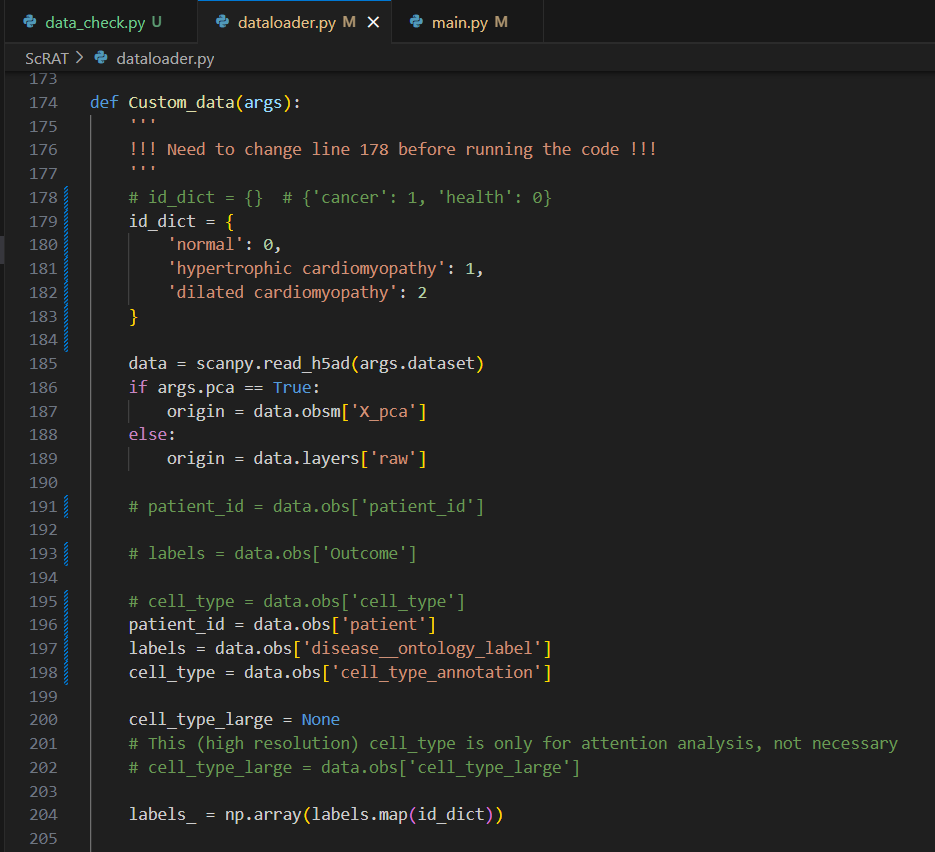
Furthermore, in the dataloader.py file, please modify the following lines:

  1. line 178 for label dictionary to map string to integer (default: {})
  2. line 185 for patient id (default: data.obs['patient_id'])
  3. line 187 for label, which is clinical phenotype for prediction (default: data.obs['Outcome'])
  4. line 189 for cell type, which assist for mixup (default: data.obs['cell_type'])

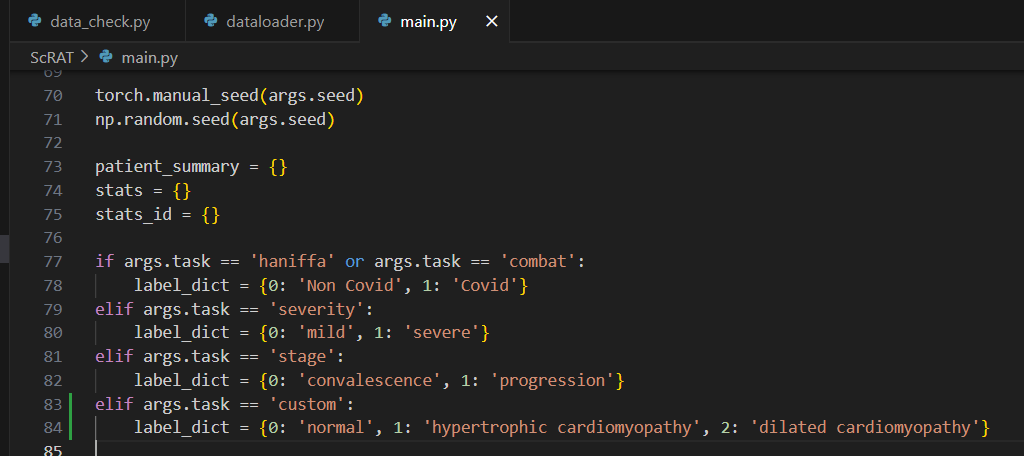
Also in the main.py file, please add elif args.task == 'custom': label_dict = {0: 'XXX', 1: 'XXX'} in line 83.


👉 /data/project/kim89/cardio.h5ad 파일을 ScRAT에 입력 데이터로 활용하여 실행
👉 ScRAT 코드 일부를 커스터마이징 (dataloader.py, main.py)


🚀 실행 준비 단계

1️⃣ 데이터 준비

당신의 데이터:
✅ cardio.h5ad
✅ 이 파일에는 최소 아래 컬럼이 필요합니다:

  • obs['patient_id']: 환자 ID
  • obs['Outcome']: 예측할 label (예: 0, 1 / control, disease)
  • obs['cell_type']: cell type 정보 (mixup 용)

👉 만약 컬럼 이름이 다르다면 h5ad를 로드해서 컬럼 이름 확인:

import scanpy as sc
adata = sc.read_h5ad('/data/project/kim89/cardio.h5ad')
print(adata.obs.columns)

필요하면 .obs 컬럼을 rename해서 h5ad 다시 저장하세요.


* cardio.h5ad 데이터에서는

더보기
"""
데이터 파일에는 최소 아래 컬럼이 필요합니다:

obs['patient_id']: 환자 ID

obs['Outcome']: 예측할 label (예: 0, 1 / control, disease)

obs['cell_type']: cell type 정보 (mixup 용)

👉 만약 컬럼 이름이 다르다면 h5ad를 로드해서 컬럼 이름 확인:
"""
import scanpy as sc
# 데이터 로드
adata = sc.read_h5ad('/data/project/kim89/cardio.h5ad')

# 컬럼 값 확인
print(adata.obs.columns)
"""
Index(['biosample_id', 'patient', 'cell_type', 'cell_type_annotation', 'sex',
       'cell_type_leiden06', 'sub_cluster', 'n_umi', 'n_genes',
       'cellranger_percent_mito', 'exon_prop', 'entropy', 'doublet_score',
       'species', 'species__ontology_label', 'disease',
       'disease__ontology_label', 'organ', 'organ__ontology_label',
       'library_preparation_protocol',
       'library_preparation_protocol__ontology_label', 'label'],
      dtype='object')
"""

# 각 컬럼 값 확인
print("🔹 biosample_id unique values:")
print(adata.obs['biosample_id'].unique())
"""
🔹 biosample_id unique values:
['LV_1622_2_nf', 'LV_1422_1_hcm', 'LV_1722_2_hcm', 'LV_1462_1_hcm', 'LV_1558_2_nf', ..., 'LV_1472_1_dcm', 'LV_1735_2_hcm', 'LV_1600_2_nf', 'LV_1606_1_dcm', 'LV_1561_2_nf']
Length: 80
Categories (80, object): ['LV_1290_1_dcm', 'LV_1290_2_dcm', 'LV_1300_1_dcm', 'LV_1300_2_dcm', ...,
                          'LV_1726_1_hcm', 'LV_1726_2_hcm', 'LV_1735_1_hcm', 'LV_1735_2_hcm']
"""

print("\n🔹 patient unique values:")
print(adata.obs['patient'].unique())
"""
🔹 patient unique values:
['P1622', 'P1422', 'P1722', 'P1462', 'P1558', ..., 'P1539', 'P1726', 'P1504', 'P1472', 'P1606']
Length: 42
Categories (42, object): ['P1290', 'P1300', 'P1304', 'P1358', ..., 'P1718', 'P1722', 'P1726', 'P1735']
"""

print("\n🔹 disease unique values:")
print(adata.obs['disease'].unique())
"""
🔹 disease unique values:
['PATO_0000461', 'MONDO_0005045', 'MONDO_0005021']
Categories (3, object): ['MONDO_0005021', 'MONDO_0005045', 'PATO_0000461']
"""

print("\n🔹 disease__ontology_label unique values:")
print(adata.obs['disease__ontology_label'].unique())
"""
🔹 disease__ontology_label unique values:
['normal', 'hypertrophic cardiomyopathy', 'dilated cardiomyopathy']
Categories (3, object): ['dilated cardiomyopathy', 'hypertrophic cardiomyopathy', 'normal']
"""

print("\n🔹 label unique values:")
print(adata.obs['label'].unique())
"""
🔹 label unique values:
[0 1 2]
"""

print("\n🔹 cell_type unique values:")
print(adata.obs['cell_type'].unique())
"""
🔹 cell_type unique values:
['CL_0000746', 'CL_0000136', 'CL_0000235', 'CL_0002350', 'CL_2000066', ..., 'CL_0000359', 'CL_0000669', 'CL_0000097', 'CL_0000542', 'CL_0000077']
Length: 13
Categories (13, object): ['CL_0000077', 'CL_0000097', 'CL_0000136', 'CL_0000235', ..., 'CL_0002350',
                          'CL_0010008', 'CL_0010022', 'CL_2000066']
"""

print("\n🔹 cell_type_annotation unique values:")
print(adata.obs['cell_type_annotation'].unique())
"""
🔹 cell_type_annotation unique values:
['cardiac muscle cell', 'fat cell', 'macrophage', 'endocardial cell', 'cardiac ventricle fibroblast', ..., 'vascular associated smooth muscle cell', 'pericyte cell', 'mast cell', 'lymphocyte', 'mesothelial cell']
Length: 13
Categories (13, object): ['cardiac endothelial cell', 'cardiac muscle cell', 'cardiac neuron',
                          'cardiac ventricle fibroblast', ..., 'mast cell', 'mesothelial cell', 'pericyte cell',
                          'vascular associated smooth muscle cell']
"""


 patient_id로 쓸 컬럼

후보

  • biosample_id: 80개 유니크 (샘플 단위, 샘플+상태 정보 포함: LV_####_#_xxx 형태)
  • patient: 42개 유니크 (환자 단위, P#### 형태)

추천

👉 patient

  • ScRAT은 환자 단위로 split/mixup을 관리하므로 환자 단위 ID가 더 적절
  • biosample_id는 같은 환자에서 여러 샘플이 있을 수 있어 patient가 mixup 방지에도 유리

 Outcome (label)으로 쓸 컬럼

후보

  • disease__ontology_label: ['normal', 'hypertrophic cardiomyopathy', 'dilated cardiomyopathy']
  • label: [0, 1, 2] (아마 disease label encoding)

추천

👉 disease__ontology_label

  • string label이라 코드 가독성/관리 용이
  • label도 쓸 수 있지만, 의미를 확인하기 어려움 → disease__ontology_label을 label_dict로 매핑하면 깔끔
label_dict = {
    'normal': 0,
    'hypertrophic cardiomyopathy': 1,
    'dilated cardiomyopathy': 2
}

 cell_type으로 쓸 컬럼

후보

  • cell_type: CL 코드 (ex. CL_0000746)
  • cell_type_annotation: cell type 이름 (ex. cardiac muscle cell)

추천

👉 cell_type_annotation

  • 사람이 보기에 직관적이고 mixup 시 분석/디버그가 쉬움
  • CL 코드 필요하면 나중에 매핑 가능

🌟 최종 선택

역할 컬럼
patient_id patient
label (Outcome) disease__ontology_label
cell_type cell_type_annotation


* covid.h5ad에서는

더보기
import scanpy as sc
# 데이터 로드
adata = sc.read_h5ad('/data/project/kim89/covid.h5ad')
print(adata.obs.columns)

# 후보 컬럼 유니크 값 출력
# 환자 ID (patient_id)
print("🔹 donor_id unique values:")
print(adata.obs['donor_id'].unique())
print()

print("🔹 patient unique values:")
print(adata.obs['patient'].unique())
print()

# Outcome (예측 label)
print("🔹 SARSCoV2_PCR_Status unique values:")
print(adata.obs['SARSCoV2_PCR_Status'].unique())
print()

print("🔹 Cohort_Disease_WHO_Score unique values:")
print(adata.obs['Cohort_Disease_WHO_Score'].unique())
print()

print("🔹 SARSCoV2_PCR_Status_and_WHO_Score unique values:")
print(adata.obs['SARSCoV2_PCR_Status_and_WHO_Score'].unique())
print()

print("🔹 Peak_Respiratory_Support_WHO_Score unique values:")
print(adata.obs['Peak_Respiratory_Support_WHO_Score'].unique())
print()

print("🔹 disease__ontology_label unique values:")
print(adata.obs['disease__ontology_label'].unique())
print()

#  cell_type
print("🔹 cell_type_annotation unique values:")
print(adata.obs['cell_type_annotation'].unique())
print()

print("🔹 Coarse_Cell_Annotations unique values:")
print(adata.obs['Coarse_Cell_Annotations'].unique())
print()

print("🔹 Detailed_Cell_Annotations unique values:")
print(adata.obs['Detailed_Cell_Annotations'].unique())
print()

"""
🔹 donor_id unique values:
['Control_Participant7', 'COVID19_Participant13', 'COVID19_Participant31', 'Control_Participant12', 'COVID19_Participant5', ..., 'COVID19_Participant18', 'COVID19_Participant27', 'COVID19_Participant21', 'COVID19_Participant20', 'COVID19_Participant30']
Length: 50
Categories (50, object): ['COVID19_Participant2', 'COVID19_Participant3', 'COVID19_Participant4',
                          'COVID19_Participant5', ..., 'Control_Participant12', 'Control_Participant13',
                          'Control_Participant14', 'Control_Participant15']

🔹 patient unique values:
['Control_Participant7', 'COVID19_Participant13', 'COVID19_Participant31', 'Control_Participant12', 'COVID19_Participant5', ..., 'COVID19_Participant18', 'COVID19_Participant27', 'COVID19_Participant21', 'COVID19_Participant20', 'COVID19_Participant30']
Length: 50
Categories (50, object): ['COVID19_Participant2', 'COVID19_Participant3', 'COVID19_Participant4',
                          'COVID19_Participant5', ..., 'Control_Participant12', 'Control_Participant13',
                          'Control_Participant14', 'Control_Participant15']

🔹 SARSCoV2_PCR_Status unique values:
['neg', 'pos']
Categories (2, object): ['neg', 'pos']

🔹 Cohort_Disease_WHO_Score unique values:
['Control_WHO_0', 'COVID19_WHO_6-8', 'COVID19_WHO_1-5']
Categories (3, object): ['COVID19_WHO_1-5', 'COVID19_WHO_6-8', 'Control_WHO_0']

🔹 SARSCoV2_PCR_Status_and_WHO_Score unique values:
['neg_0', 'pos_8', 'pos_6', 'pos_5', 'pos_4', 'pos_3', 'pos_1', 'pos_7']
Categories (8, object): ['neg_0', 'pos_1', 'pos_3', 'pos_4', 'pos_5', 'pos_6', 'pos_7', 'pos_8']

🔹 Peak_Respiratory_Support_WHO_Score unique values:
['0', '8', '6', '5', '4', '3', '1', '7']
Categories (8, object): ['0', '1', '3', '4', '5', '6', '7', '8']

🔹 disease__ontology_label unique values:
['normal', 'COVID-19']
Categories (2, object): ['COVID-19', 'normal']

🔹 cell_type_annotation unique values:
['Developing Ciliated Cells', 'Ciliated Cells', 'Secretory Cells', 'Squamous Cells', 'Goblet Cells', ..., 'Developing Secretory and Goblet Cells', 'Plasmacytoid DCs', 'Enteroendocrine Cells', 'Erythroblasts', 'Mast Cells']
Length: 18
Categories (18, object): ['B Cells', 'Basal Cells', 'Ciliated Cells', 'Dendritic Cells', ...,
                          'Plasmacytoid DCs', 'Secretory Cells', 'Squamous Cells', 'T Cells']

🔹 Coarse_Cell_Annotations unique values:
['Developing Ciliated Cells', 'Ciliated Cells', 'Secretory Cells', 'Squamous Cells', 'Goblet Cells', ..., 'Developing Secretory and Goblet Cells', 'Plasmacytoid DCs', 'Enteroendocrine Cells', 'Erythroblasts', 'Mast Cells']
Length: 18
Categories (18, object): ['B Cells', 'Basal Cells', 'Ciliated Cells', 'Dendritic Cells', ...,
                          'Plasmacytoid DCs', 'Secretory Cells', 'Squamous Cells', 'T Cells']

🔹 Detailed_Cell_Annotations unique values:
['Developing Ciliated Cells', 'FOXJ1 high Ciliated Cells', 'BEST4 high Cilia high Ciliated Cells', 'Cilia high Ciliated Cells', 'SERPINB11 high Secretory Cells', ..., 'Enteroendocrine Cells', 'Interferon Responsive Cytotoxic CD8 T Cells', 'Interferon Responsive Secretory Cells', 'Erythroblasts', 'Mast Cells']
Length: 39
Categories (39, object): ['AZGP1 SCGB3A1 LTF high Goblet Cells', 'AZGP1 high Goblet Cells', 'B Cells',
                          'BEST4 high Cilia high Ciliated Cells', ..., 'SCGB1A1 high Goblet Cells',
                          'SERPINB11 high Secretory Cells', 'SPRR2D high Squamous Cells',
                          'VEGFA high Squamous Cells']
"""


환자 ID (patient_id)

후보 내용
donor_id Control_ParticipantX, COVID19_ParticipantX 같은 형태
patient 동일한 값 (=donor_id)

🔹 추천: donor_id

  • patient와 값이 동일 → donor_id가 더 직관적이고 표준적

Outcome (label)

후보 내용 목적
SARSCoV2_PCR_Status 'neg', 'pos' 이진 분류: 감염 여부
Cohort_Disease_WHO_Score 'Control_WHO_0', 'COVID19_WHO_1-5', 'COVID19_WHO_6-8' severity 분류
disease__ontology_label 'normal', 'COVID-19' 이진 분류 (control vs COVID-19)

🔹 추천:

  • disease__ontology_label

💡 예를 들어 label dict:

id_dict = {'normal': 0, 'COVID-19': 1}

cell type

후보 내용
cell_type_annotation 18개 타입, mixup 용도로 충분히 구체적
Coarse_Cell_Annotations = cell_type_annotation
Detailed_Cell_Annotations 39개, 더 세분화됨 (필요 시 선택 가능)

🔹 추천: cell_type_annotation

  • 구체적이고 mixup 분석하기에 직관적
  • 너무 세분화된 Detailed_Cell_Annotations는 overfitting 가능성 있음

🌟 최종 추천

역할 컬럼 label dict 예시
patient_id donor_id -
Outcome disease__ontology_label {'normal': 0, 'COVID-19': 1}
cell_type cell_type_annotation -

🚀 다음 단계

👉 ScRAT용 코드:

id_dict = {'normal': 0, 'COVID-19': 1}
patient_id = data.obs['donor_id']
labels = data.obs['disease__ontology_label']        
cell_type = data.obs['cell_type_annotation']

severity 분류로 하실 경우 알려주시면 label_dict도 바로 만들어 드리겠습니다.
필요하면 새 h5ad 생성 코드까지 작성해 드릴 수 있습니다! 🚀
어떤 task로 진행할지 결정하시면 말씀해 주세요.


2️⃣ ScRAT 코드 수정

👉 dataloader.py

# line 178 수정
id_dict = {
    'normal': 0,
    'hypertrophic cardiomyopathy': 1,
    'dilated cardiomyopathy': 2
}

# line 185, 187, 189 수정
patient_id = data.obs['patient']
label = data.obs['disease__ontology_label']
cell_type = data.obs['cell_type_annotation']

👉 main.py

# line 83 추가
elif args.task == 'custom':
    label_dict = {0: 'normal', 1: 'hypertrophic cardiomyopathy', 2: 'dilated cardiomyopathy'}


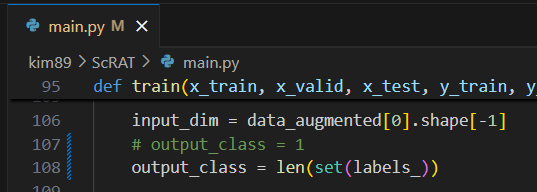
* 현재 코드들은 이진 분류(binary classification)를 기본으로 하고 있기 때문에, 다중 클래스(multi-class) 분류로 확장하기 위해

아래의 과정들 수정해주자.


- output_class를 3으로 수정

# line 107 수정
# 현재 코드들은 이진 분류(binary classification)를 기본으로 하고 있기 때문에, 다중 클래스(multi-class) 분류로 확장하기 위해
# 현재는 고정적으로 1로 설정되어 있습니다
# output_class를 3으로 수정
output_class = len(set(labels_))  # 또는 3


- BCELoss → CrossEntropyLoss로 변경

# line 167~ 수정
# 현재 코드들은 이진 분류(binary classification)를 기본으로 하고 있기 때문에, 다중 클래스(multi-class) 분류로 확장하기 위해
if output_class == 1:
    loss = nn.BCELoss()(sigmoid(out), y_)
elif output_class == 3:
    loss_fn = nn.CrossEntropyLoss()
    loss = loss_fn(out, y_.long().view(-1))


- valid loop에서 sigmoid + majority voting 관련 처리 제거 및 변경

with torch.no_grad():
    for batch in valid_loader:
        x_ = torch.from_numpy(data[batch[0]]).float().to(device).squeeze(0)
        y_ = batch[1].int().to(device)

        out = model(x_)

        if output_class == 1:
            out = sigmoid(out)
            loss = nn.BCELoss()(out, y_ * torch.ones_like(out))
            valid_loss.append(loss.item())

            out = out.detach().cpu().numpy()

            # majority voting for binary classification
            f = lambda x: 1 if x > 0.5 else 0
            func = np.vectorize(f)
            voted = func(out).reshape(-1)
            out = np.argmax(np.bincount(voted))
            pred.append(out)
            true.append(y_.item())

        else:
            loss_fn = nn.CrossEntropyLoss()
            loss = loss_fn(out, y_.long().view(-1))
            valid_loss.append(loss.item())

            out = out.detach().cpu().numpy()

            # average prediction across cells → then argmax
            avg_logits = out.mean(axis=0)  # shape: (n_class,)
            pred_label = np.argmax(avg_logits)
            pred.append(pred_label)
            true.append(y_.item())


- test loop에서 sigmoid + majority voting 관련 처리 제거 및 변경

best_model.eval()
pred = []
test_id = []
true = []
wrong = []
prob = []

with torch.no_grad():
    for batch in test_loader:
        x_ = torch.from_numpy(data[batch[0]]).float().to(device).squeeze(0)
        y_ = batch[1].int().numpy()
        id_ = batch[2][0]

        out = best_model(x_)

        if output_class == 1:
            # === Binary Classification ===
            out = sigmoid(out)
            out = out.detach().cpu().numpy().reshape(-1)

            y_label = y_[0][0]
            true.append(y_label)

            if args.model != 'Transformer':
                prob.append(out[0])
            else:
                prob.append(out.mean())

            # majority voting
            f = lambda x: 1 if x > 0.5 else 0
            func = np.vectorize(f)
            out = np.argmax(np.bincount(func(out).reshape(-1))).reshape(-1)[0]
            pred.append(out)

            test_id.append(patient_id[batch[2][0][0][0]])
            if out != y_label:
                wrong.append(patient_id[batch[2][0][0][0]])

        else:
            # === Multi-class Classification ===
            out = out.detach().cpu().numpy()  # shape: (n_cells, n_classes)
            avg_logits = out.mean(axis=0)     # shape: (n_classes,)
            pred_label = np.argmax(avg_logits)
            prob.append(avg_logits[pred_label])

            y_label = y_[0][0]
            true.append(y_label)
            pred.append(pred_label)

            test_id.append(patient_id[batch[2][0][0][0]])
            if pred_label != y_label:
                wrong.append(patient_id[batch[2][0][0][0]])


-  평가 부분도 수정 필요

if len(wrongs) == 0:
    wrongs = set(wrong)
else:
    wrongs = wrongs.intersection(set(wrong))

# AUC 계산 방식 분기
try:
    if output_class == 1:
        test_auc = metrics.roc_auc_score(true, prob)
    else:
        test_auc = metrics.roc_auc_score(true, prob, multi_class='ovr')
except:
    test_auc = 0.0

test_acc = accuracy_score(true, pred)

# 출력
for idx in range(len(pred)):
    true_label = int(true[idx])
    pred_label = int(pred[idx])
    print(f"{test_id[idx]} -- true: {label_dict[true_label]} -- pred: {label_dict[pred_label]}")

test_accs.append(test_acc)

# Confusion Matrix 및 지표 분기
if output_class == 1:
    cm = confusion_matrix(true, pred).ravel()
    recall = cm[3] / (cm[3] + cm[2])
    precision = cm[3] / (cm[3] + cm[1]) if (cm[3] + cm[1]) != 0 else 0
    print("Confusion Matrix: " + str(cm))
else:
    cm = confusion_matrix(true, pred)
    recall = metrics.recall_score(true, pred, average='macro')
    precision = metrics.precision_score(true, pred, average='macro')
    print("Confusion Matrix:\n", cm)

print("Best performance: Epoch %d, Loss %f, Test ACC %f, Test AUC %f, Test Recall %f, Test Precision %f" % (
    max_epoch, max_loss, test_acc, test_auc, recall, precision))

for w in wrongs:
    v = patient_summary.get(w, 0)
    patient_summary[w] = v + 1

return test_auc, test_acc, cm, recall, precision

기타 체크 사항:

  • TransformerPredictor 클래스가 num_classes=output_class를 받을 수 있어야 함 → 확인 필요
  • MyDataset 클래스가 다중 클래스 라벨을 제대로 반환하고 있는지 확인 필요 (y_ 반환값의 shape 확인)
  • 평가 지표(정확도, confusion matrix 등)도 multi-class에 맞게 처리되었는지 확인

+ mixups() 관련 수정 1,2,3,4,5

+ https://doraemin.tistory.com/242 수정


3️⃣ 실행

가상환경 활성화 후 실행:

cd /data/project/kim89/ScRAT
source scrat/bin/activate

python main.py --dataset /data/project/kim89/cardio.h5ad --task custom

# 최소한의 학습으로 코드 돌아가는지 확인하기
# python main.py --dataset /data/project/kim89/cardio_pca.h5ad --task custom_cardio --batch_size 1 --train_sample_cells 50 --test_sample_cells 50 --heads 2 --emb_dim 32 --epochs 3
# python main.py --dataset /data/project/kim89/covid_pca.h5ad --task custom_covid --batch_size 1 --train_sample_cells 50 --test_sample_cells 50 --heads 2 --emb_dim 32 --epochs 3

# gpu 최대로 활용하여 학습
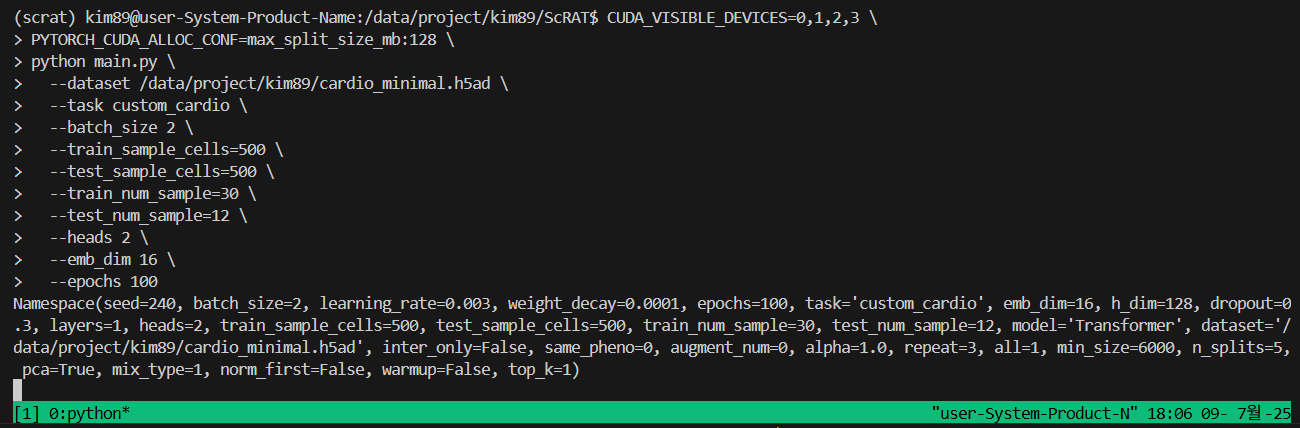
CUDA_VISIBLE_DEVICES=0,1,2,3 \
PYTORCH_CUDA_ALLOC_CONF=max_split_size_mb:128 \
python main.py \
  --dataset /data/project/kim89/cardio_minimal.h5ad \
  --task custom_cardio \
  --batch_size 2 \
  --train_sample_cells=500 \
  --test_sample_cells=500 \
  --train_num_sample=30 \
  --test_num_sample=12 \
  --heads 2 \
  --emb_dim 16 \
  --epochs 100


더보기

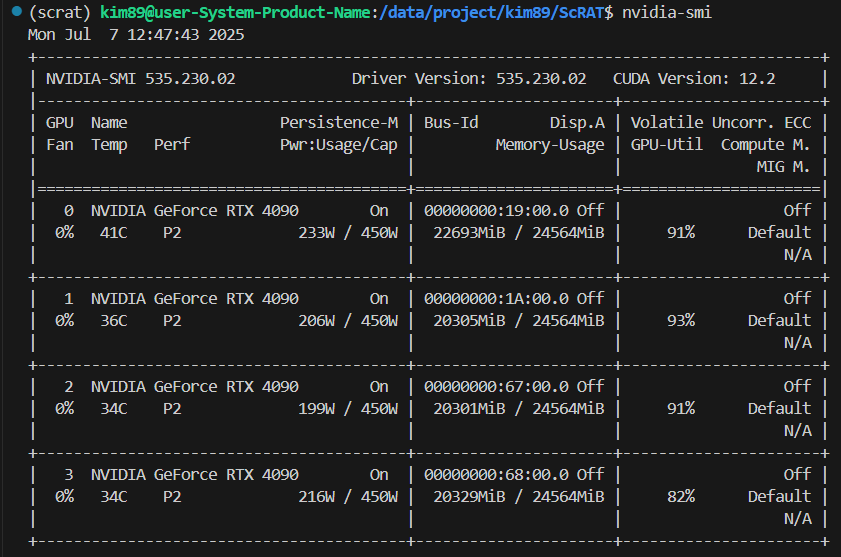
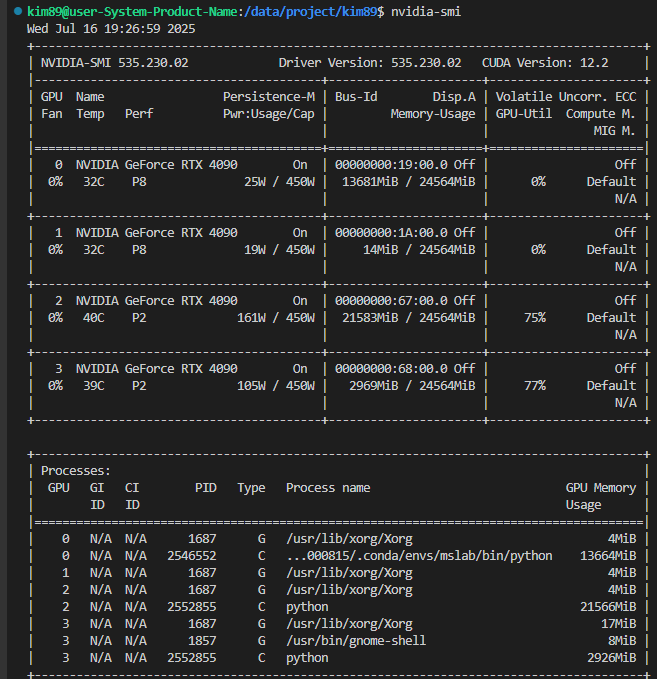
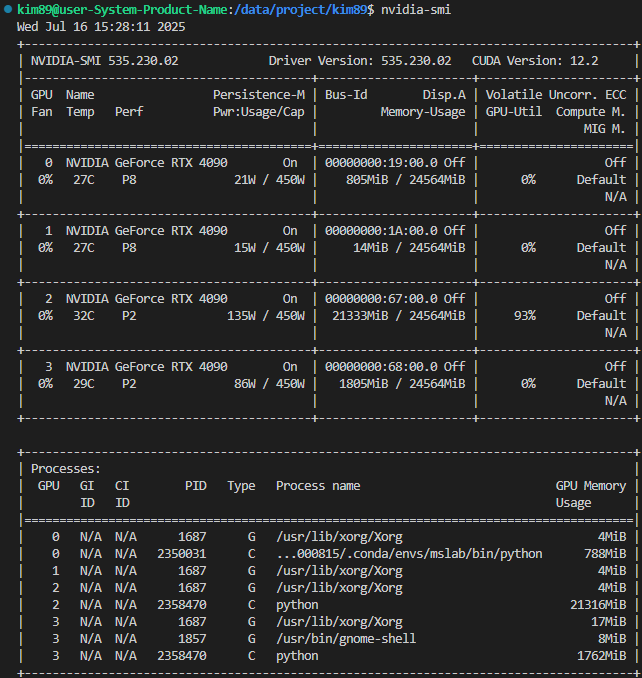
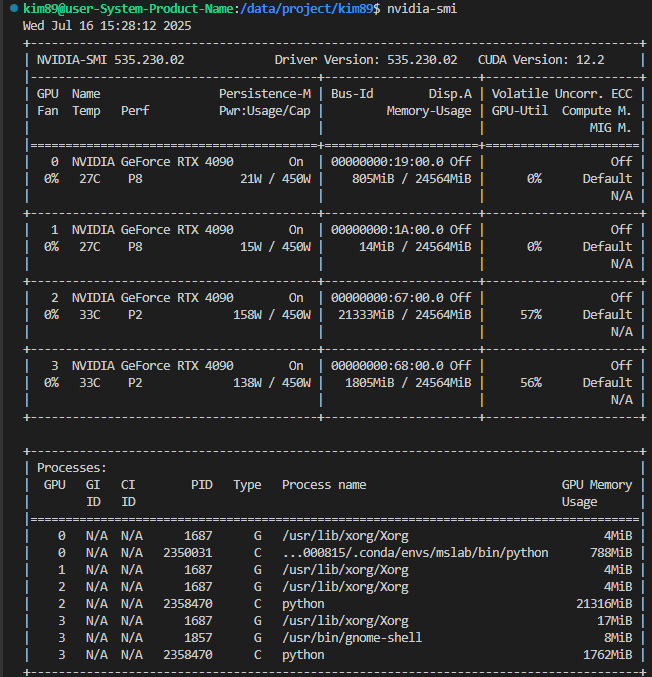
gpu 최대로 활용하여 학습 했을 때,


현재 상태

👉 nvidia-smi 결과에 따르면:

  • GPU 0: 22.7 GiB / 24.5 GiB 사용 (91% 사용률)
  • GPU 1: 20.3 GiB / 24.5 GiB 사용 (93% 사용률)
  • GPU 2: 20.3 GiB / 24.5 GiB 사용 (91% 사용률)
  • GPU 3: 20.3 GiB / 24.5 GiB 사용 (82% 사용률)

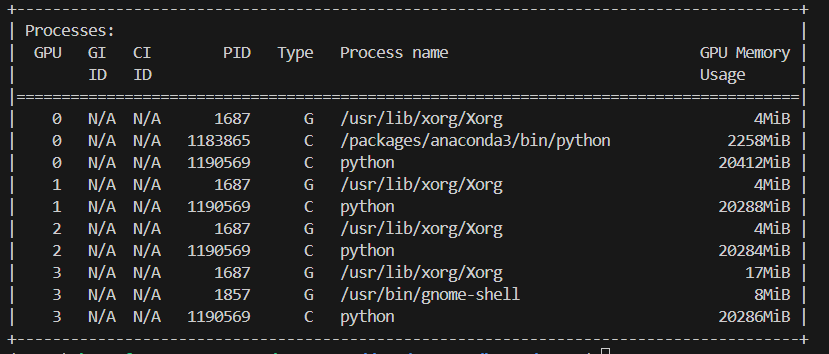
👉 Processes 확인:

  • 동일한 Python 프로세스 (PID 1190569)GPU 0,1,2,3 메모리 모두 잡고 있습니다.
  • 즉, 현재 코드가 멀티 GPU 사용 중입니다 (아마 DataParallel).

현재 코드만으로 더 학습 가능한가?

👉 지금 상황

  • 이미 GPU 메모리의 대부분을 사용하고 있습니다.
  • batch size, 모델 크기 (emb_dim, heads 등) 더 키우면 OOM 날 가능성이 높습니다.

👉 추가 학습 가능성

  • 지금 세팅으로 가능한 최대 규모로 학습 중입니다.
  • ✅ 더 큰 데이터, 더 큰 모델 학습은 현재 구조(예: DataParallel)로는 더 이상 확장 어렵습니다.

👉 왜?

  • DataParallel은 GPU마다 동일 모델의 복사본을 메모리에 올리고 forward/backward pass를 나눔
  • 그래서 GPU 개수 늘려도 메모리 이득은 거의 없고, 단지 연산 속도만 소폭 증가

그럼 더 학습하려면?

💡 현 구조 한계

  • DataParallel 방식은 메모리를 효율적으로 나누지 못합니다.

💡 대안
1️⃣ DistributedDataParallel (DDP)
→ GPU간 메모리 효율적 분산 학습 (각 GPU가 데이터 subset만 처리)
→ torchrun + DDP로 코드 변경 필요

2️⃣ Gradient Accumulation
→ 작은 batch 여러 번 forward-backward 후 한 번 update
→ batch_size 늘린 효과, 메모리 footprint 유지 가능

3️⃣ 모델 경량화
→ emb_dim, heads, layers 줄이고 학습 반복 횟수 (repeat) 늘려 통계적 의미 확보


📌 결론

✅ 현재 코드와 세팅으로는 GPU를 최대로 사용 중이고, 추가 학습 효과를 보기는 어렵습니다.
DDP + gradient accumulation 으로 넘어가야 더 큰 데이터, 더 큰 모델 학습이 가능해요

< n_splits >
전체 데이터(여기선 환자)를 몇 개의 fold로 나눌 것인지 결정
n_splits=2이면: 한 번 나눌 때 50%는 훈련(train), 50%는 테스트(test)로 분할됨
n_splits=5이면: 80% train / 20% test로 나눔 (5개의 조합이 돌아가며 test set이 됨)

< repeat >
KFold 분할을 몇 번 반복할지 설정
예: repeat=1이면 한 번만 나누고 끝
예: repeat=5이면 서로 다른 seed로 5번 반복해서 더 다양한 조합을 실험에 반영
 여러 번 반복해서 실험의 신뢰성과 일반화 성능을 더 잘 평가할 수 있음
* main.py의 309번째 줄에 'args.repeat * 100'으로 되어 있어 ;  --repeat 1이면 실제로 100회 반복

< 기본값> 
n_splits = 5
repeat = 3

그리고 ScRAT 코드에서 이 값이 이렇게 쓰입니다:
rkf = RepeatedKFold(n_splits=n_splits, n_repeats=repeat * 100, ...)
즉: rkf = RepeatedKFold(n_splits=5, n_repeats=3 * 100 = 300)
이 말은 최대 300 × 5 = 1500번의 split 시도가 가능하다는 의미입니다.

하지만 아래 조건이 있어서:
iter_count = 0 ... if iter_count == n_splits * repeat: break
→ 최종적으로 정상적인 학습이 완료된 split만 15개 수집됩니다:

✅ 최종 valid split 수 = n_splits × repeat = 5 × 3 = 15개

test set에 클래스가 하나만 있으면 skip되고,skip되더라도 다음 split을 계속 시도해서 총 15개의 valid split을 확보합니다.최종적으로 ✅ Total valid splits used: 15가 출력되면, 정상적으로 15개 실험이 완료된 것입니다.


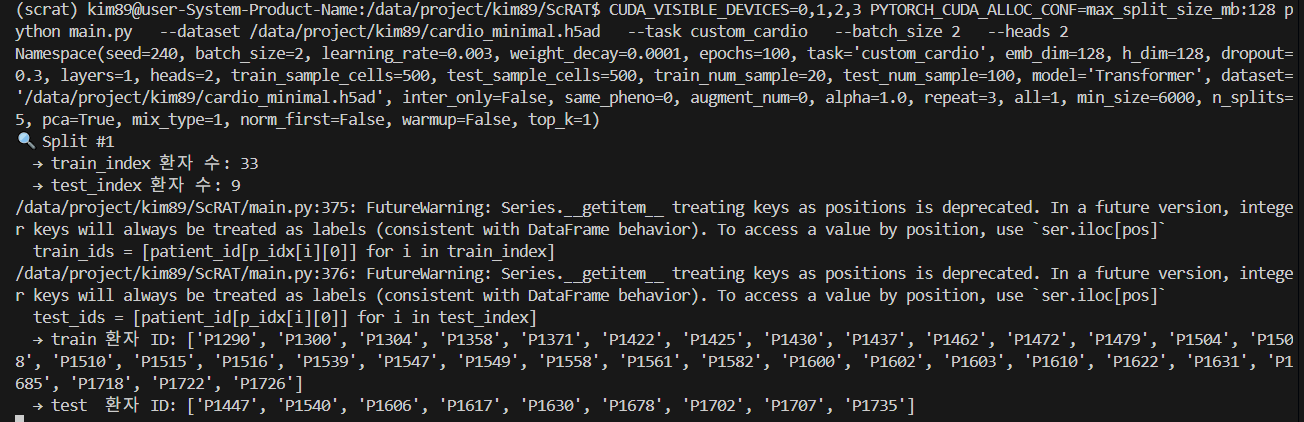
--train_sample_cells 500 # 학습 시 각 환자 샘플에서 500개 세포를 랜덤 선택
--test_sample_cells 500 # 테스트 시에도 동일하게 500개 세포 선택

--train_num_sample 20 # 한 명의 환자에서 500개의 세포를 20번 샘플링하여 20개의 bag 생성
--test_num_sample 100 # 테스트도 같은 방식으로 100개의 bag 생성

--inter_only False) # mixup된 샘플만 학습에 사용할지 여부
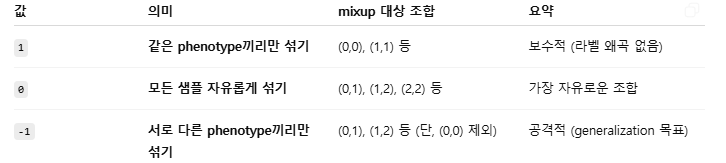
--same_pheno 0 # 같은 클래스끼리 mixup할지, 다른 클래스끼리 할지
--augment_num 0 # Mixup된 새로운 가짜 샘플을 몇 개 생성할지
--alpha 1.0 # mixup의 비율 (Beta 분포 파라미터)


코드가 잘 작동된다!


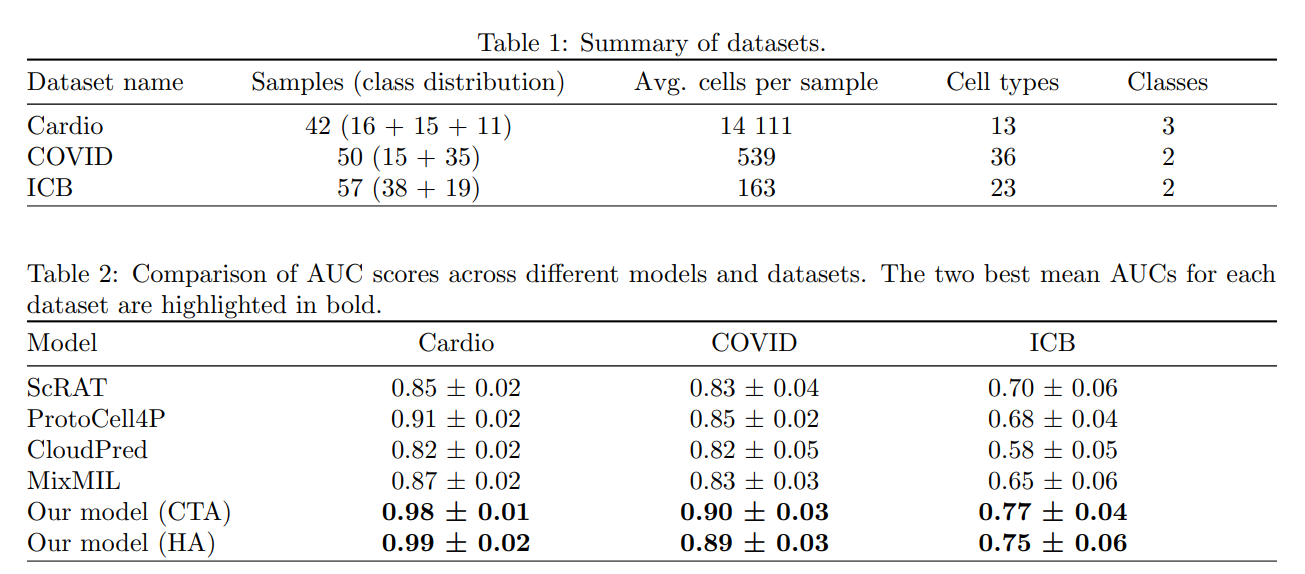
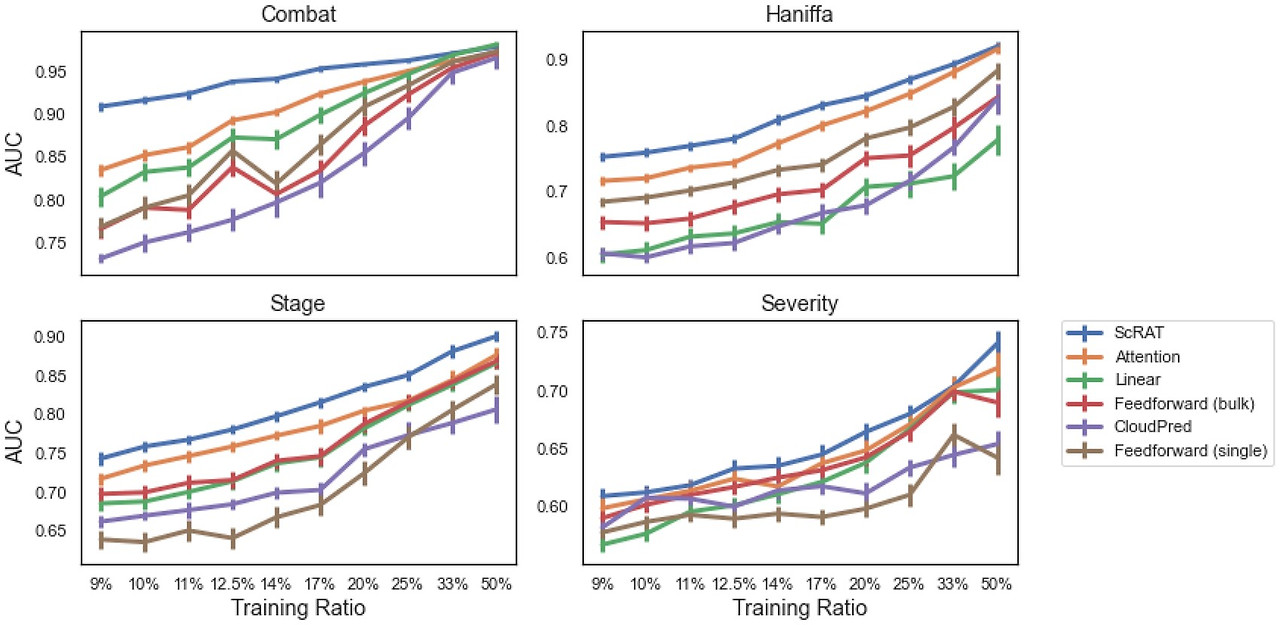
+ 논문에서 제공된 결과

(좌) HierMIL 논문 결과 (우) ScRAT 논문 결과


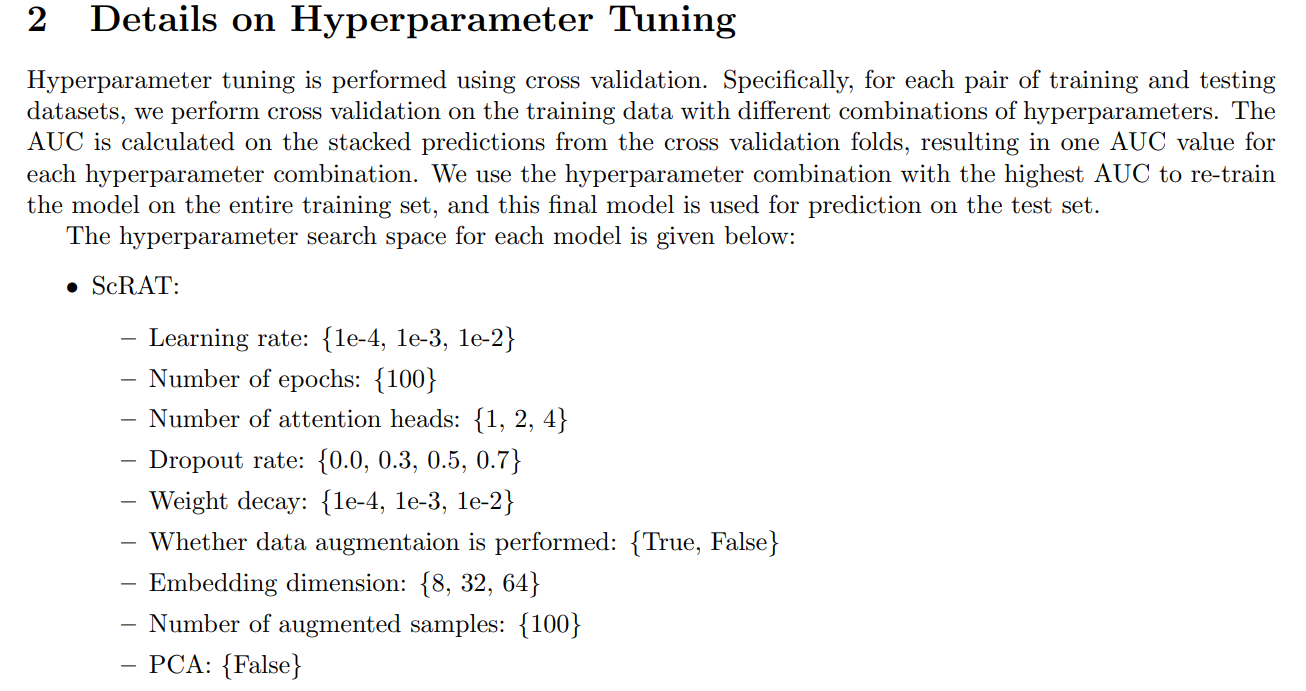
 * HMIL 논문에 제공된 hyperparameter

media-1.pdf
2.55MB


* covid 데이터셋 결과

* HMIL 논문에 제공된 hyperparameter tunig실행

run_hyperparameter_tunning.sh
0.00MB


# 가장 AUC 높은 값
# learning_rate,head,dropout,weight_decay,emb_dim,test_auc
1e-4,4,0.0,1e-4,8,0.944444

# 참고로, lr=1e-4로 고정하고 나머지 값에 대해서만, hyperparameter tuning 수행함.


* 기본값으로 실행  (Test ACC 0.70, Test AUC 0.85 )

더보기
CUDA_VISIBLE_DEVICES=0,1,2,3 PYTORCH_CUDA_ALLOC_CONF=max_split_size_mb:128 python main.py   --dataset /data/project/kim89/covid_pca.h5ad  --task custom_covid  --batch_size 2   --train_sample_cells=500   --test_sample_cells=500
# 어떤 split은 4명 test, 15명 train
# 어떤 split은 3명 test, 16명 train
Best performance: Test ACC 0.700000+-0.124722, Test AUC 0.855556+-0.228657, Test Recall 0.922222+-0.159474, Test Precision 0.716667+-0.163299

CUDA_VISIBLE_DEVICES=0,1,2,3 PYTORCH_CUDA_ALLOC_CONF=max_split_size_mb:128 python main.py   --dataset /data/project/kim89/covid_pca.h5ad  --task custom_covid  --batch_size 2   --train_sample_cells=300   --test_sample_cells=300
# 어떤 split은 6명 test, 26명 train
# 어떤 split은 7명 test, 25명 train
Best performance: Test ACC 0.673016+-0.151950, Test AUC 0.567593+-0.289465, Test Recall 0.877778+-0.223331, Test Precision 0.696825+-0.176783


더보기

* 추가로  돌려본 것들

# ---------------------19개 학습------------------
# def Custom_data() : if len(tt_idx) < 500:  # exclude the sample with the number of cells fewer than 500
# train_num_sample : 19, test_num_sample : 13 => 이 중 500 cells 이상인, 19개 sample만 학습됨
CUDA_VISIBLE_DEVICES=0,1,2,3 PYTORCH_CUDA_ALLOC_CONF=max_split_size_mb:128 python main.py   --dataset /data/project/kim89/covid_pca.h5ad  --task custom_covid  --batch_size 2   --train_sample_cells=300   --test_sample_cells=300   --train_num_sample=19   --test_num_sample=13
# 결과
# Best performance: Test ACC 0.700000+-0.124722, Test AUC 0.855556+-0.228657, Test Recall 0.922222+-0.159474, Test Precision 0.716667+-0.163299


# def Custom_data() : if len(tt_idx) < max(args.train_sample_cells, args.test_sample_cells)
# train_num_sample : 10, test_num_sample : 9 => 500 cells 이상인, 19개 sample 학습.
CUDA_VISIBLE_DEVICES=0,1,2,3 PYTORCH_CUDA_ALLOC_CONF=max_split_size_mb:128 python main.py   --dataset /data/project/kim89/covid_pca.h5ad  --task custom_covid  --batch_size 2   --train_sample_cells=500   --test_sample_cells=500   --train_num_sample=10   --test_num_sample=9
# 결과
# Best performance: Test ACC 0.700000+-0.124722, Test AUC 0.855556+-0.228657, Test Recall 0.922222+-0.159474, Test Precision 0.716667+-0.163299

# ---------------------32개 학습------------------
# def Custom_data() : if len(tt_idx) < max(args.train_sample_cells, args.test_sample_cells)
# train_num_sample : 19, test_num_sample : 13 => 모두 다 학습됨.
CUDA_VISIBLE_DEVICES=0,1,2,3 PYTORCH_CUDA_ALLOC_CONF=max_split_size_mb:128 python main.py   --dataset /data/project/kim89/covid_pca.h5ad  --task custom_covid  --batch_size 2   --train_sample_cells=300   --test_sample_cells=300   --train_num_sample=19   --test_num_sample=13
# 결과
# Best performance: Test ACC 0.673016+-0.151950, Test AUC 0.567593+-0.289465, Test Recall 0.877778+-0.223331, Test Precision 0.696825+-0.176783

# def Custom_data() : if len(tt_idx) < max(args.train_sample_cells, args.test_sample_cells)
# train_num_sample : 20, test_num_sample : 12 => 모두 다 학습됨.
CUDA_VISIBLE_DEVICES=0,1,2,3 PYTORCH_CUDA_ALLOC_CONF=max_split_size_mb:128 python main.py   --dataset /data/project/kim89/covid_pca.h5ad  --task custom_covid  --batch_size 2   --train_sample_cells=300   --test_sample_cells=300   --train_num_sample=19   --test_num_sample=13
# 결과
# Best performance: Test ACC 0.673016+-0.151950, Test AUC 0.567593+-0.289465, Test Recall 0.877778+-0.223331, Test Precision 0.696825+-0.176783

# def Custom_data() : if len(tt_idx) < max(args.train_sample_cells, args.test_sample_cells)
# train_num_sample : 16, test_num_sample : 16 => 모두 다 학습됨.
CUDA_VISIBLE_DEVICES=0,1,2,3 PYTORCH_CUDA_ALLOC_CONF=max_split_size_mb:128 python main.py   --dataset /data/project/kim89/covid_pca.h5ad  --task custom_covid  --batch_size 2   --train_sample_cells=300   --test_sample_cells=300   --train_num_sample=16   --test_num_sample=16
# 결과
# Best performance: Test ACC 0.673016+-0.151950, Test AUC 0.567593+-0.289465, Test Recall 0.877778+-0.223331, Test Precision 0.696825+-0.176783


* cardio 데이터셋 결과

CUDA_VISIBLE_DEVICES=2,3 \
PYTORCH_CUDA_ALLOC_CONF=max_split_size_mb:64 \
python main.py \
  --dataset /data/project/kim89/cardio_minimal.h5ad \
  --task custom_cardio \
  --learning_rate 1e-4 \
  --epochs 100 \
  --heads 1 \
  --dropout 0.5 \
  --weight_decay 1e-4 \
  --emb_dim 8 \
  --augment_num 5 \
  --pca False \
  --batch_size 1 \
  --min_size 1000

더보기

* 추가로 해본 것들... -> 성능 안 나옴

HMIL 논문에 제공된 hyperparameter로 실행 + --train_sample_cells 10000


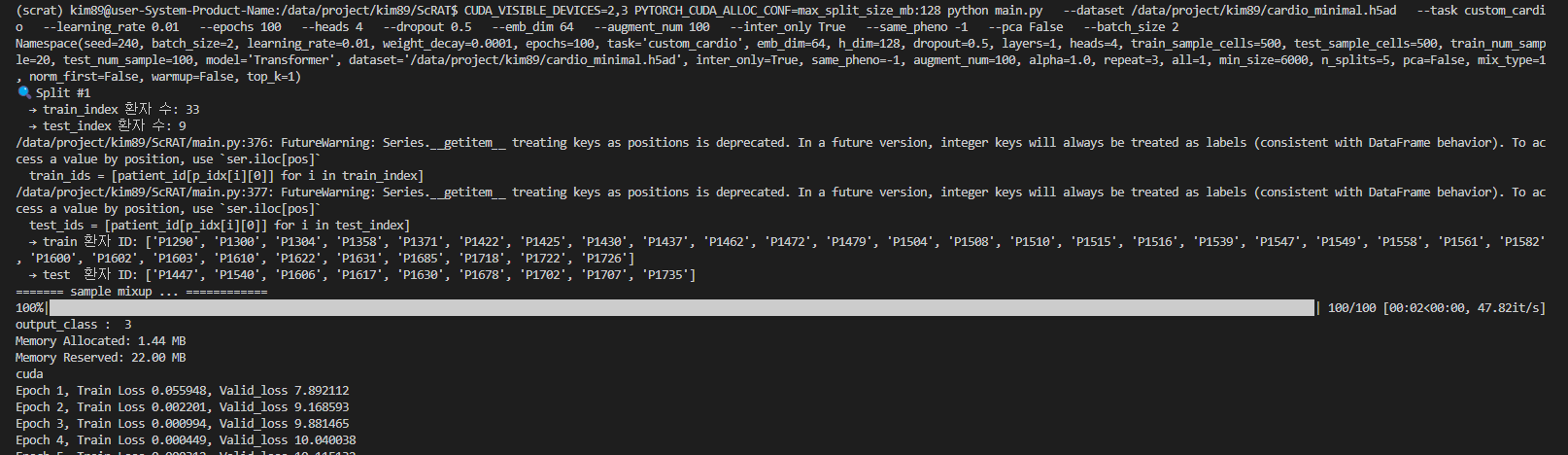
* HMIL 논문에 제공된 hyperparameter로 실행 ( gpu 2,3 ; max_split_size_mb:128, batch_size 2) -> 성능 안 나옴

더보기
CUDA_VISIBLE_DEVICES=2,3 \
PYTORCH_CUDA_ALLOC_CONF=max_split_size_mb:128 \
python main.py \
  --dataset /data/project/kim89/cardio_minimal.h5ad \
  --task custom_cardio \
  --learning_rate 1e-4 \
  --epochs 100 \
  --heads 4 \
  --dropout 0.5 \
  --weight_decay 1e-4 \
  --emb_dim 64 \
  --augment_num 100 \
  --inter_only True \
  --same_pheno -1 \
  --pca False \
  --batch_size 2
CUDA_VISIBLE_DEVICES=2,3 \
PYTORCH_CUDA_ALLOC_CONF=max_split_size_mb:128 \
python main.py \
  --dataset /data/project/kim89/cardio_minimal.h5ad \
  --task custom_cardio \
  --learning_rate 0.01 \
  --epochs 100 \
  --heads 2 \
  --dropout 0.5 \
  --emb_dim 64 \
  --augment_num 100 \
  --inter_only True \
  --same_pheno -1 \
  --pca False \
  --batch_size 2
  
  
=================================
=== Final Evaluation (average across all splits) ===
=================================
Best performance: Test ACC 0.321296,   Test AUC 0.075000,   Test Recall 0.300000,   Test Precision 0.112654
=================================
=== 저희 논문용 Final Evaluation (average across all splits) ===
=================================
Best performance: Test ACC 0.321296+-0.188934, Test AUC 0.075000+-0.203101, Test Recall 0.300000+-0.124722, Test Precision 0.112654+-0.071135


* .  (Test ACC 0.33, Test AUC 0.00 -> 성능 안 나옴 )

더보기

Test ACC 0.33, Test AUC 0.00

CUDA_VISIBLE_DEVICES=0,1,2,3 \
PYTORCH_CUDA_ALLOC_CONF=max_split_size_mb:128 \
python main.py \
  --dataset /data/project/kim89/cardio.h5ad \
  --task custom_cardio \
  --batch_size 1 \
  --heads 2 \
  --learning_rate 0.01 \
  --emb_dim 64 \
  --pca False 
  # → train_index 환자 수: 33
  # → test_index 환자 수: 9


Confusion Matrix:
 [[3 0 0]
 [4 0 0]
 [2 0 0]]
Best performance: Epoch 1, Loss 1.063645, Test ACC 0.333333, Test AUC 0.000000, Test Recall 0.333333, Test Precision 0.111111
✅ Total valid splits used: 1


* 기본 설정으로 실행해본 것 (Test ACC 0.35, Test AUC 0.09 -> 성능 안 나옴)

더보기


CUDA_VISIBLE_DEVICES=0,1,2,3 PYTORCH_CUDA_ALLOC_CONF=max_split_size_mb:128 python main.py   --dataset /data/project/kim89/cardio_minimal.h5ad   --task custom_cardio   --batch_size 2   --heads 2
# 어떤 split은 9명 test, 33명 train
# 어떤 split은 8명 test, 34명 train
=================================
=== Final Evaluation (average across all splits) ===
=================================
Best performance: Test ACC 0.354630,   Test AUC 0.092063,   Test Recall 0.354815,   Test Precision 0.169982
=================================
=== 저희 논문용 Final Evaluation (average across all splits) ===
=================================
Best performance: Test ACC 0.354630+-0.229447, Test AUC 0.092063+-0.209896, Test Recall 0.354815+-0.177892, Test Precision 0.169982+-0.154554


더보기

* --emb_dim 16 으로 성능이 너무 안 나와서, 중단함

CUDA_VISIBLE_DEVICES=0,1,2,3 \
PYTORCH_CUDA_ALLOC_CONF=max_split_size_mb:128 \
python main.py \
  --dataset /data/project/kim89/cardio_minimal.h5ad \
  --task custom_cardio \
  --batch_size 2 \
  --heads 2 \
  --emb_dim 16
# 어떤 split은 9명 test, 33명 train
# 어떤 split은 8명 test, 34명 train


Confusion Matrix:
 [[0 3 0]
 [0 4 0]
 [0 2 0]]
Best performance: Epoch 1, Loss 0.944177, Test ACC 0.444444, Test AUC 0.000000, Test Recall 0.333333, Test Precision 0.148148
✅ Total valid splits used: 1


Confusion Matrix:
 [[0 4 0]
 [0 2 0]
 [1 2 0]]
Best performance: Epoch 1, Loss 1.268232, Test ACC 0.222222, Test AUC 0.000000, Test Recall 0.333333, Test Precision 0.083333
✅ Total valid splits used: 2


Confusion Matrix:
 [[0 4 0]
 [0 1 0]
 [0 3 0]]
Best performance: Epoch 1, Loss 0.798926, Test ACC 0.125000, Test AUC 0.000000, Test Recall 0.333333, Test Precision 0.041667
✅ Total valid splits used: 3


Confusion Matrix:
 [[1 0 0]
 [2 2 0]
 [0 3 0]]
Best performance: Epoch 2, Loss 0.730647, Test ACC 0.375000, Test AUC 0.000000, Test Recall 0.500000, Test Precision 0.244444
✅ Total valid splits used: 4


더보기

* --emb_dim 64 으로 성능이 너무 안 나와서, 중단함

CUDA_VISIBLE_DEVICES=0,1,2,3 \
PYTORCH_CUDA_ALLOC_CONF=max_split_size_mb:128 \
python main.py \
  --dataset /data/project/kim89/cardio_minimal.h5ad \
  --task custom_cardio \
  --batch_size 2 \
  --heads 2 \
  --emb_dim 64
# 어떤 split은 9명 test, 33명 train
# 어떤 split은 8명 test, 34명 train


Confusion Matrix:
 [[3 0 0]
 [4 0 0]
 [2 0 0]]
Best performance: Epoch 2, Loss 0.755023, Test ACC 0.333333, Test AUC 0.000000, Test Recall 0.333333, Test Precision 0.111111
✅ Total valid splits used: 1


Confusion Matrix:
 [[0 4 0]
 [0 2 0]
 [0 3 0]]
Best performance: Epoch 1, Loss 0.866745, Test ACC 0.222222, Test AUC 0.000000, Test Recall 0.333333, Test Precision 0.074074
✅ Total valid splits used: 2


Confusion Matrix:
 [[0 4 0]
 [0 1 0]
 [0 3 0]]
Best performance: Epoch 1, Loss 0.888302, Test ACC 0.125000, Test AUC 0.000000, Test Recall 0.333333, Test Precision 0.041667
✅ Total valid splits used: 3


Confusion Matrix:
 [[0 1 0]
 [0 4 0]
 [0 3 0]]
Best performance: Epoch 1, Loss 0.957637, Test ACC 0.500000, Test AUC 0.000000, Test Recall 0.333333, Test Precision 0.166667
✅ Total valid splits used: 4


 [[2 0 2]
 [0 0 4]
 [0 0 0]]
Best performance: Epoch 1, Loss 0.892665, Test ACC 0.250000, Test AUC 0.500000, Test Recall 0.166667, Test Precision 0.333333
✅ Total valid splits used: 5


더보기

**

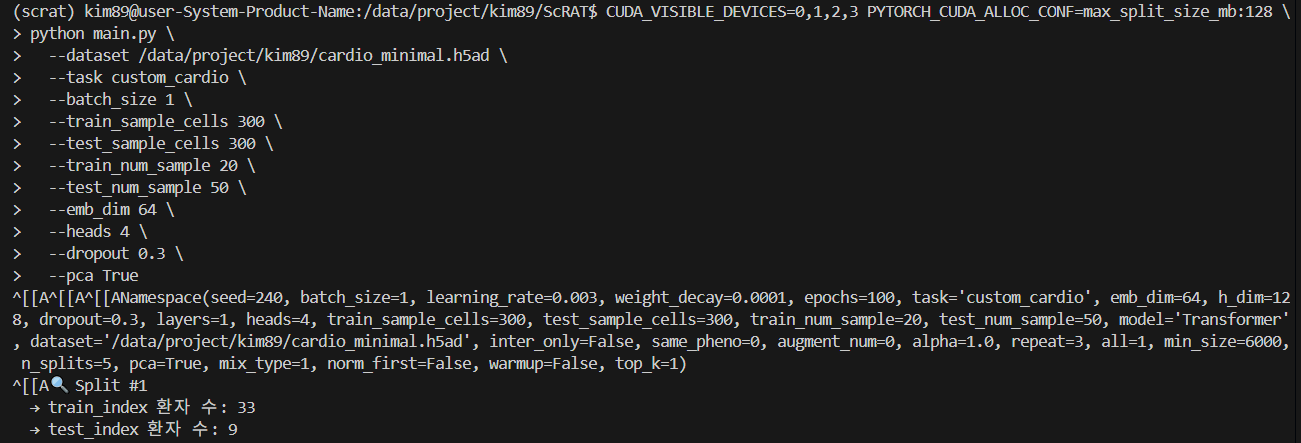
CUDA_VISIBLE_DEVICES=0,1,2,3 PYTORCH_CUDA_ALLOC_CONF=max_split_size_mb:128 \
python main.py \
  --dataset /data/project/kim89/cardio_minimal.h5ad \
  --task custom_cardio \
  --batch_size 1 \
  --train_sample_cells 300 \
  --test_sample_cells 300 \
  --train_num_sample 20 \
  --test_num_sample 50 \
  --emb_dim 64 \
  --heads 4 \
  --dropout 0.3 \
  --pca True

* torchmetrics 버전 에러 발생시

더보기


💡 에러 원인

ImportError: cannot import name '_compare_version' from 'torchmetrics.utilities.imports'

👉 이 에러는 설치된 pytorch_lightning 버전과 torchmetrics 버전이 호환되지 않기 때문에 발생했습니다.

🔹 pytorch_lightning 1.7.7은 torchmetrics 0.x 또는 초기 1.x 버전과 주로 호환되는데
현재 설치된 torchmetrics는 너무 최신 버전(1.5.x 이상)이라 내부 구조가 달라져 _compare_version을 찾지 못하고 있습니다.


🚀 해결 방법

 1️⃣ torchmetrics 버전을 pytorch_lightning 1.7.7에 맞게 낮추기

pip install torchmetrics==0.10.3

👉 torchmetrics 0.10.3은 pytorch_lightning 1.7.7과 잘 맞습니다.


2️⃣ 설치 확인

설치되면 버전 체크:

pip show torchmetrics

출력에 Version: 0.10.3 나오면 OK.


3️⃣ 다시 실행

python main.py --dataset /data/project/kim89/cardio.h5ad --task custom

💡 참고

ScRAT은 pytorch_lightning 1.x 계열 기반으로 작성되어 torchmetrics 최신 (1.5+)은 호환이 깨집니다.
👉 torchmetrics==0.10.3, pytorch_lightning==1.7.7 조합이 가장 안전합니다.

* KeyError: 'X_pca' 

더보기

💡 에러 원인

KeyError: 'X_pca'

👉 ScRAT 코드 (dataloader.py 187줄)에서

origin = data.obsm['X_pca']

를 시도하는데, 당신의 cardio.h5ad 파일에는 obsm['X_pca']가 존재하지 않기 때문에 발생한 에러입니다.


🔍 왜 이런 일이 생겼을까요?

  • obsm['X_pca']는 보통 PCA 차원 축소 결과를 저장하는 필드
  • ScRAT은 이걸 전제하고 데이터에서 PCA로 축소된 feature를 로드하려고 함
  • 하지만 현재 h5ad는 PCA가 사전에 계산되어 저장되어 있지 않음

🚀 해결 방법

✅ 1️⃣ PCA를 사전에 계산하여 h5ad에 추가

아래와 같은 스크립트로 PCA를 추가하고 새 파일로 저장하세요:

import scanpy as sc

adata = sc.read_h5ad('/data/project/kim89/cardio.h5ad')

# PCA 실행
sc.pp.pca(adata, n_comps=50)  # 필요에 따라 n_comps 조절

# 결과 저장
adata.write('/data/project/kim89/cardio_pca.h5ad')

그 다음 실행 시:

python main.py --dataset /data/project/kim89/cardio_pca.h5ad --task custom

✅ 2️⃣ 또는 ScRAT 코드에서 PCA 수행 부분을 추가 (비추천)

ScRAT 내부에서 PCA를 수행하도록 dataloader.py를 수정할 수도 있습니다:

if 'X_pca' not in data.obsm:
    import scanpy as sc
    sc.pp.pca(data, n_comps=50)

👉 하지만 코드 일관성과 재사용성을 위해 PCA 포함된 h5ad 파일로 준비하는 쪽을 추천드립니다.


🌟 정리

👉 cardio.h5ad에 PCA가 없어 발생한 에러입니다.
👉 PCA 수행 후 h5ad를 다시 저장하고 그 파일을 ScRAT에 입력하세요.

* 현재 설치된 PyTorch 버전이 RTX 4090 GPU를 지원하지 않아서 발생한 에러

더보기

💡 이번 에러의 핵심 원인

RuntimeError: CUDA error: no kernel image is available for execution on the device

👉 현재 설치된 PyTorch 버전이 RTX 4090 GPU를 지원하지 않아서 발생한 에러입니다.
경고에서도 이미 말해주고 있죠:

NVIDIA GeForce RTX 4090 with CUDA capability sm_89 is not compatible with the current PyTorch installation.
The current PyTorch install supports CUDA capabilities sm_37 sm_50 sm_60 sm_70.

즉, RTX 4090 (sm_89)에서 실행할 수 있는 CUDA 커널 코드가 PyTorch 빌드에 포함되어 있지 않다는 뜻입니다.


왜 발생했나?

  • 현재 설치된 PyTorch (1.10.0)는 RTX 4090이 출시되기 전 버전이라 RTX 4090 아키텍처 (Ada Lovelace, sm_89)를 지원하지 않습니다.
  • PyTorch 1.10은 sm_70 (Volta) 정도까지 지원합니다.

🚀 해결 방법

🔹 최신 PyTorch로 업그레이드

👉 RTX 4090을 지원하려면 PyTorch 1.13 이상, 권장 버전은 1.13.1, 2.x 이상입니다.

🔑 예시 (CUDA 11.8, RTX 4090 호환):

pip install torch==2.0.1+cu118 torchvision==0.15.2+cu118 torchaudio==2.0.2 --extra-index-url https://download.pytorch.org/whl/cu118

# 디스크 공간 부족으로 다운로드/설치 실패시,
# 설치를 임시 공간(/data/project/kim89/pip_cache)에 지정
mkdir -p /data/project/kim89/pip_cache
mkdir -p /data/project/kim89/tmp

TMPDIR=/data/project/kim89/tmp \
pip install --cache-dir=/data/project/kim89/pip_cache \
torch==2.0.1+cu118 torchvision==0.15.2+cu118 torchaudio==2.0.2 \
--extra-index-url https://download.pytorch.org/whl/cu118

# 설치 끝나면 /data/project/kim89/pip_cache와 /data/project/kim89/tmp를 지워서 공간을 확보하세요:
# rm -rf /data/project/kim89/pip_cache /data/project/kim89/tmp

또는 최신:

pip install torch torchvision torchaudio --index-url https://download.pytorch.org/whl/cu118

🔹 주의

  • pytorch_lightning==1.7.7이 최신 torch와 호환되는지 확인해야 합니다. 보통 1.13+ torch는 lightning 1.8 이상과 잘 맞습니다.
  • 따라서 pytorch_lightning도 1.8 이상으로 함께 업그레이드하는 것이 안전합니다.

예:

pip install pytorch_lightning==1.9.0

# 설치를 임시 공간(/data/project/kim89/pip_cache)에 지정 시
TMPDIR=/data/project/kim89/tmp \
pip install --cache-dir=/data/project/kim89/pip_cache \
pytorch_lightning==1.9.0

🔹 임시 CPU 실행

만약 GPU를 쓰지 않고 급하게 CPU로만 돌리려면:

CUDA_VISIBLE_DEVICES="" python main.py --dataset ... --task custom

하지만 RTX 4090이 있으면 최신 torch 설치하는 것이 훨씬 낫습니다.


🌟 정리

✅ 에러 원인: PyTorch 1.10.0이 RTX 4090 (sm_89)을 지원하지 않음
✅ 해결책: PyTorch 최신 버전 + CUDA 11.8 이상 버전 설치


* torch.cuda.OutOfMemoryError

더보기

💡 에러 핵심

torch.cuda.OutOfMemoryError: CUDA out of memory. Tried to allocate 64.80 GiB
(GPU 0; 23.65 GiB total capacity; ...)

👉 현재 모델이 GPU 메모리 64.8 GB를 한 번에 할당하려다 실패했습니다.
하지만 RTX 4090의 실제 GPU 메모리는 약 24GB인데, 그보다 훨씬 큰 메모리를 요청했습니다.


왜 이런 일이 발생했을까?

👉 Transformer 구조에서 scaled_dot_product 연산이 메모리를 많이 소모했기 때문입니다:

attn_logits = torch.matmul(q, k.transpose(-2, -1))

여기서:

  • q, k의 시퀀스 길이가 너무 크면
  • q @ k^T 는 O(seq_len² * dim) 메모리를 필요로 합니다.

즉:
🔹 cell 수나 sequence length가 너무 큽니다
🔹 또는 batch size가 너무 큽니다


🚀 해결 방법

1️⃣ batch size 줄이기

현재 ScRAT 실행 인자에 --batch_size 옵션을 더 작게 주십시오:

python main.py --dataset /data/project/kim89/cardio_pca.h5ad --task custom --batch_size 4

또는 2까지 줄여 보세요.


2️⃣ train_sample_cells, test_sample_cells 줄이기

현재 args 값:

train_sample_cells=500
test_sample_cells=500

➡ 너무 많으면:

--train_sample_cells 200 --test_sample_cells 200

또는 더 줄여 100, 50 시도


3️⃣ heads, emb_dim 줄이기

지금:

heads=8
emb_dim=128

➡ 줄이기:

--heads 4 --emb_dim 64

또는 더 작게


4️⃣ model parallel / gradient checkpointing

ScRAT 코드에 적용은 복잡하지만, PyTorch gradient checkpointing을 쓰면 메모리를 많이 줄일 수 있습니다. 필요하면 방법 알려드릴 수 있어요.


🌟 추천 실행 예시

python main.py --dataset /data/project/kim89/cardio_pca.h5ad --task custom \
--batch_size 2 --train_sample_cells 100 --test_sample_cells 100 --heads 4 --emb_dim 64

Tip

이런 메모리 초과는 Transformer에서 sequence length² 메모리 때문에 생깁니다.

따라서 cell 수, head 수, embedding dim 줄이는 것이 최우선 대응입니다.


ValueError: Only one class present in y_true. ROC AUC score is not defined in that case.

더보기

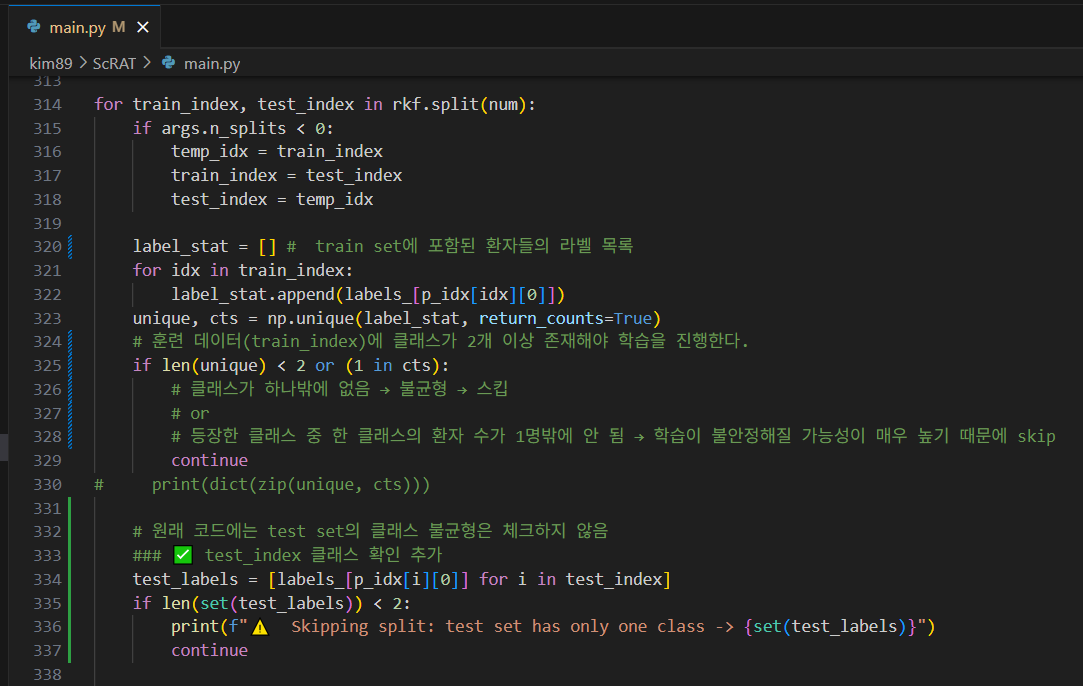
< 첫번째 수정 해야할 것 >

훈련 데이터(train_index)에 클래스가 2개 이상 존재해야 학습을 진행하는 조건이 있지만,

test data에는 없음.

test_index 클래스 확인 추가하자.

    label_stat = [] #  train set에 포함된 환자들의 라벨 목록
    for idx in train_index:
        label_stat.append(labels_[p_idx[idx][0]])
    unique, cts = np.unique(label_stat, return_counts=True)
    # 훈련 데이터(train_index)에 클래스가 2개 이상 존재해야 학습을 진행한다.
    if len(unique) < 2 or (1 in cts): 
        # 클래스가 하나밖에 없음 → 불균형 → 스킵 
        # or 
        # 등장한 클래스 중 한 클래스의 환자 수가 1명밖에 안 됨 → 학습이 불안정해질 가능성이 매우 높기 때문에 skip
        continue
#     print(dict(zip(unique, cts)))
    
    # 원래 코드에는 test set의 클래스 불균형은 체크하지 않음
    ### ✅ test_index 클래스 확인 추가
    test_labels = [labels_[p_idx[i][0]] for i in test_index]
    if len(set(test_labels)) < 2:
        print(f"⚠️  Skipping split: test set has only one class -> {set(test_labels)}")
        continue

< 두번째 수정 해야할 것 >


p_idx는 다음 조건에 따라 필터링되기 때문에 실제 유효 환자 수가 지정해준 값보다 적을 수 있습니다:

 
if len(tt_idx) < 500:  # 셀 수 500개 미만인 환자 제외
    continue

또한, label별 환자 수 균형이 맞지 않다면 일부 split에서 클래스가 하나만 포함되는 테스트셋이 만들어질 수 있습니다.


 예를 들어 보면:

환자 ID Label
1~20 0
21~58 1
 

만약 KFold로 잘못 나눠서 test에 21~50만 들어가면 → label 1만 존재
→ ROC AUC 계산 불가 → split skip됨


코드를 수정해주자.

# if len(tt_idx) < 500:  # exclude the sample with the number of cells fewer than 500
if len(tt_idx) < max(args.train_sample_cells, args.test_sample_cells):


* 참고로, 그럼 train_sample_cells와 test_sample_cells 가 사용되는 곳은 : 


  • sampling() 단계에서 환자 셀 중 무작위로 train_sample_cells만큼 샘플링해서 모델에 넘깁니다.
  • test_sample_cells도 마찬가지.

하지만 문제는?

Custom_data()에서 하드코딩된 500 셀 이상 필터 때문에
환자 자체가 걸러지는 것이 우선 발생하고,
그 다음에야 train_sample_cells만큼 샘플링이 이뤄짐.

그래서 코드를 수정해주었으니 이제 내가 원하는 수의 환자가 다 활용된다!


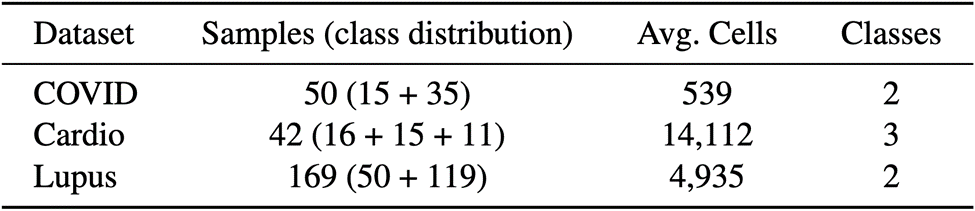
< 내가 가진 데이터 >


<Cardio>

  • 전체 셀 수: 592,689개
  • 셀 수 ≥ 500인 환자 수: 42명
  • 500개 미만 셀을 가진 환자 수: 0 이므로 전부 500개 이상 셀을 가진 환자지만, label이 유효하지 않거나 누락된 환자가 일부 있어 최종적으로 유효 환자는 42명
  • 환자별 라벨 분포 (총 42명 중):
    • 클래스 1 (hypertrophic or dilated): 26명
    • 클래스 0 (normal): 16명

따라서, hyperparameter

  --train_sample_cells=500 \
  --test_sample_cells=500 \

으로 해주자.


<Covid>

전체 환자 수     50 = 19+31
500셀 이상 환자 수 19명 (= 12명 + 7명)

클래스 분포
label=1 (COVID-19): 12명
label=0 (normal): 7명

=> 300셀 이상 가진 환자 수는 32(=추가된 13 + 원래 19)

따라서, hyperparameter
  --train_sample_cells=300 \
  --test_sample_cells=300 \
으로 해주자.


최종 코드

data_check_cardio.py
0.01MB
data_check_covid.py
0.01MB
dataloader.py
0.01MB
main.py
0.02MB

# 실행 방법은 아래와 같습니다.
# 1. Setup
git clone https://github.com/yuzhenmao/ScRAT
cd ScRAT
python -m venv scrat
source scrat/bin/activate
pip install -r requirements.txt

# 2. PCA 추가
# 데이터에 PCA를 추가하는 Python 코드를 실행합니다.
# ※ 데이터 경로는 직접 수정해주셔야 합니다.
pip install scanpy
python data_check.py

# 3.실행 코드 교체
# dataloader.py와 main.py는 보내드린 파일로 교체해주세요.

# 4-1. cardio 데이터 실행
# ※ --dataset 경로는 수정해주셔야 합니다.
python main.py --dataset /data/project/kim89/cardio_pca.h5ad --task custom_cardio

# 4-2. covid 데이터 실행
# ※ --dataset 경로는 수정해주셔야 합니다.
python main.py --dataset /data/project/kim89/covid_pca.h5ad --task custom_covid


### 에러 발생 시 참고
# 'torchmetrics.utilities.imports' 에러 발생 시
pip install torchmetrics==0.10.3

# 'RuntimeError: CUDA error: no kernel image is available for execution on the device' 에러 발생 시
# 현재 설치된 PyTorch 버전이 RTX 4090 GPU를 지원하지 않아서 발생한 에러
pip install torch==2.0.1+cu118 torchvision==0.15.2+cu118 torchaudio==2.0.2 --extra-index-url https://download.pytorch.org/whl/cu118
# pytorch_lightning==1.7.7이 최신 torch와 호환되는지 확인해야 합니다. 보통 1.13+ torch는 lightning 1.8 이상과 잘 맞습니다.
pip install pytorch_lightning==1.9.0